AutoQ guides your review / audit team through 111 data center controls and writes the statement of fact, risk, effect and recommendation for every answer, ready for the report.
Try the sample control on the right. Choose an answer to see the finding AutoQ writes.
DS-14Data Security / Network SecurityRisk 3 · High
Determine if the network is segmented by firewalls between the internet, DMZ and internal zones, and firewall rules are reviewed at least semiannually.
NIST SC-7ISO 8.20, 8.22COBIT DSS05.02
Audit response
Generated finding
111controls, each with a test procedure and evidence list
5categories, from physical security to change management
Approval, configuration, governance, segregation of duties
All categories
111
33
Try it
Free 14 Day Hosted Trial · Coming Soon
Hosted projects on the AutoQ server: each project with its own link and passwords, and an account page for your organization. Coming soon. To hear first when hosted trials open, write to sales@autoq-ai.com.
Features
Everything from the first test to the final report
AutoQ replaces the spreadsheet-and-Word routine of a data center audit with one shared workspace.
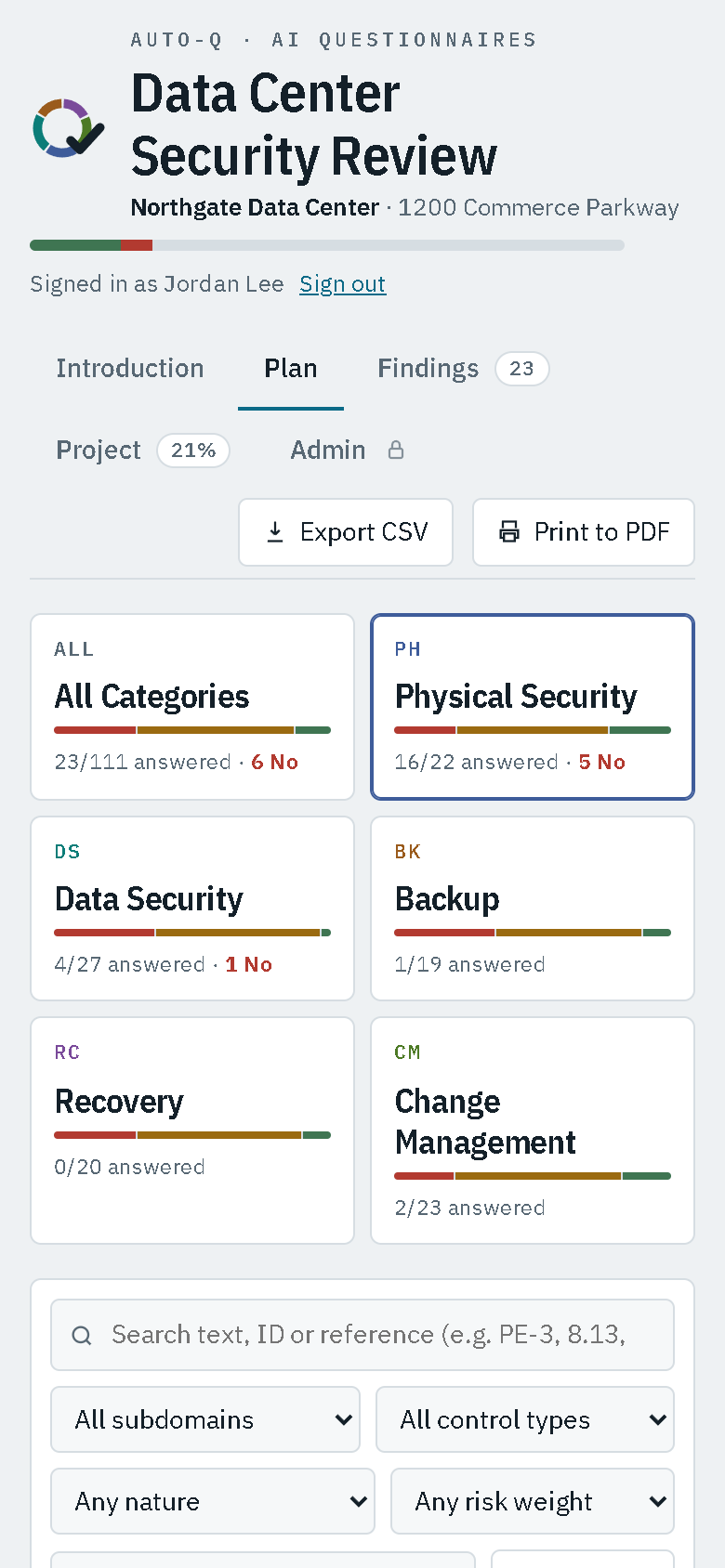
Plan
A questionnaire that tells you what to do
Each control is phrased as an action: "Determine if…"
Suggested test procedure and the evidence to request
Filter by category, subdomain, control type, nature, risk or answer
Search by framework reference, such as PE-3, 8.13 or DSS05
Opens on the work still to do
Upload the evidence you examined to each control, and view it by category on Findings (Enterprise Version 2.1)
Findings
Report text that writes itself
A statement of fact for every Confirmed and No answer
The auditor's comment added as a sentence after it
Exceptions grouped by category, highest risk first
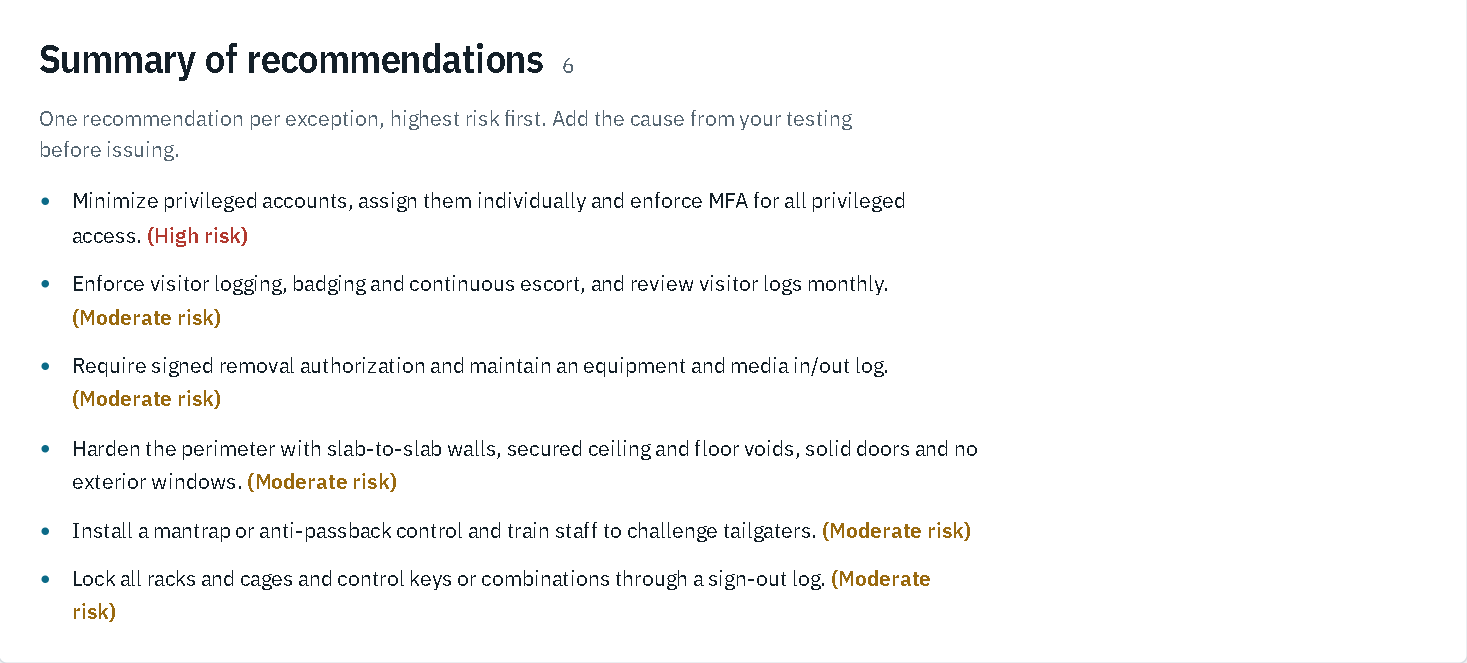
A summary of recommendations ordered from high to low risk
Copy the whole report as text into Word
Project
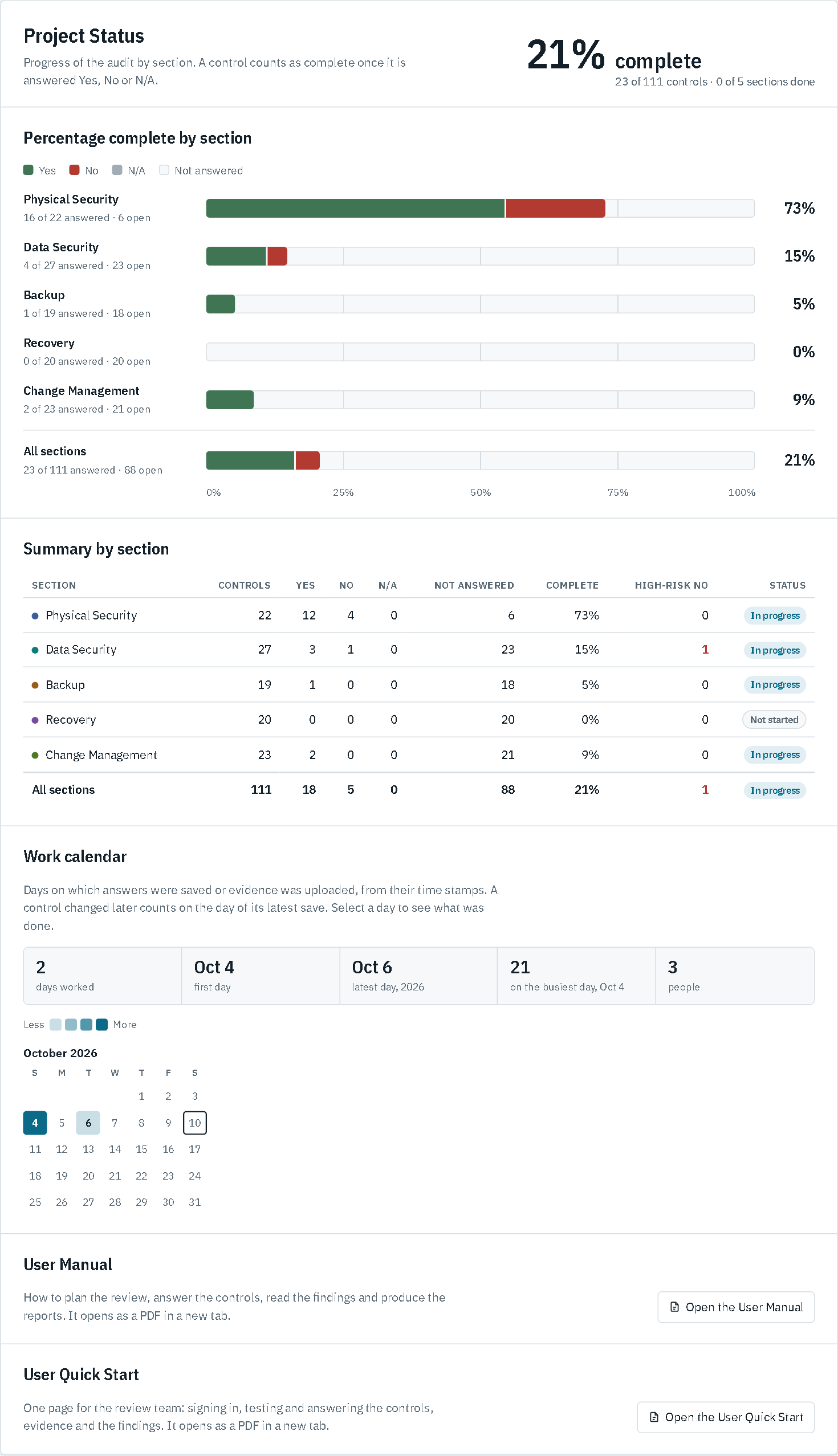
Progress you can see at a glance
Percentage complete overall and by category
Yes, No and N/A counts and high-risk exceptions per section
Not started, In progress or Complete status for each category
Reports
PDF and CSV from any page
Save the Introduction, Plan, Findings or Project tab as a PDF or Word document
Export CSV with all 111 controls, answers, comments and finding text
Use the CSV as an evidence request list for the auditee
Enterprise
Project reports on your letterhead
Opening conference letter, one-page getting started guide for the team, project status report, project review meeting agenda and final report
Figures, exceptions, ratings and findings filled in from the answers
Your logo, project details and wording; edit the standard text or the templates
Preview, then create a PDF and download it from the Admin tab
Quick guides
Your team working on day one
A one-page getting started guide for each auditor: the address, signing in, answering a control, their assignments and the deadline
A one-page User Quick Start for the team: signing in, testing and answering, evidence and the findings
A one-page Administrator Quick Start: install, secure, connect the team, run the review, finish
Full User and Administrator Manuals when you need the detail, all listed on the Admin tab
Team
One questionnaire, the whole team
Answers appear on everyone's screen within seconds
Each answer records who saved it and when
Unsaved comments are kept if a colleague edits the same control
Works on computers, tablets and phones
Excel
Your workbook stays the record
No complex database to administer. The standalone version runs everything from a standard Excel workbook, with all editing going directly to and from the spreadsheet. That makes it easy to add to and edit the questionnaire content.
The standalone edition saves every answer straight into the Excel workbook
The workbook's own formulas and category ratings recalculate in Excel
Edits made in Excel appear in the app within seconds
The site details are written to a Site Details sheet, so they travel with the workbook
Automatic workbook backups, 30 kept
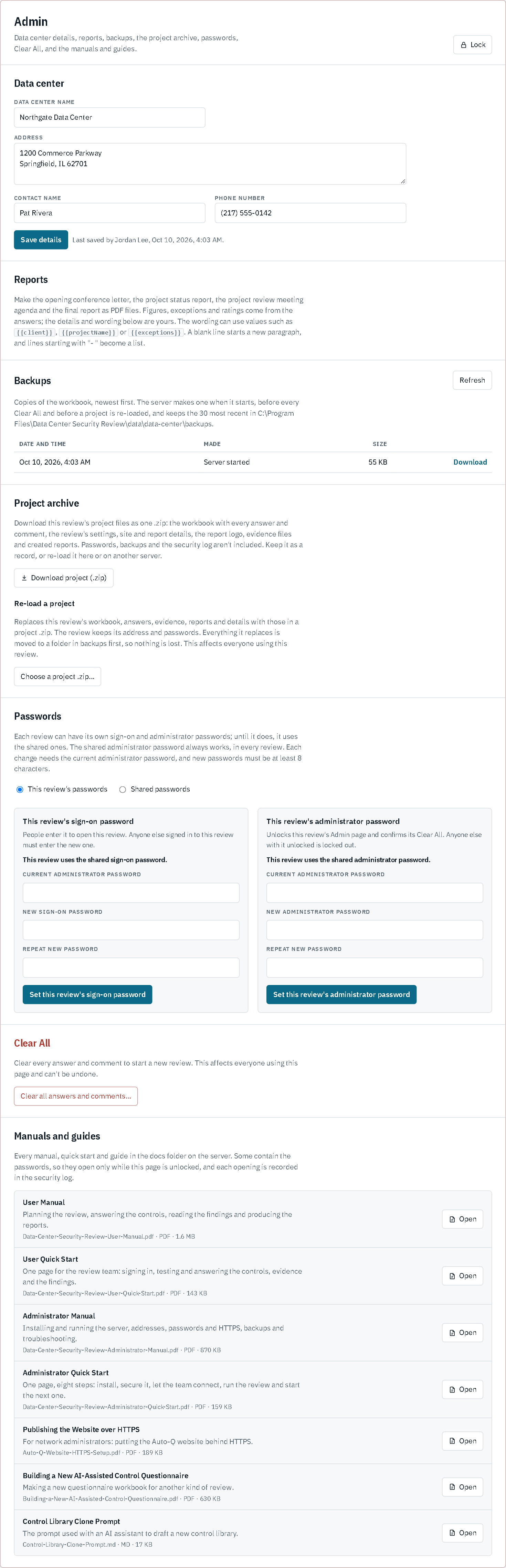
Admin
Controls for the audit lead
Record the data center's name, address and contact
Make the project reports as PDFs (Enterprise Version 2.1)
List and download workbook backups
Download the whole project as one .zip, and re-load a project (Enterprise Version 2.1)
Change the sign-on and administrator passwords
Clear all answers to start the next review
Editions
Hosted or on your own network
Hosted: open a shared link and sign in with your account
Standalone: runs on one Windows computer, set up with a single installer
Both editions look and work the same way
Category ratings
Every category gets a rating, weighted by risk
The workbook rates each category from its answers. N/A answers are left out. The thresholds can be adjusted to your methodology.
Effective
No high-risk failures, and a weighted failure rate below 10%.
Partially effective
Any high-risk failure, or a weighted failure rate of 10% or more.
Ineffective
Two or more high-risk failures, or a weighted failure rate above 30%.
Incomplete
Until every control in the category is answered.
How it works
Four stages, one workspace
The review follows the way auditors already work. Review loops back to testing whenever a finding needs correcting or follow-up.
Questionnaire1 · Answer
PH-05F
DS-14T
BK-03T
RC-07NA
CM-11T
Findings2 · Finding
Risk 2 · Moderate
Deliverables3 · Report
PDF
CSV
AnswerT, F or NA with a comment, saved to the workbookFindingStatement of fact, risk, effect and recommendationReportPDF for the report, CSV for the working papers
Plan
Agree the scope with the data center owner
Assign each category to a team member
Send evidence requests from the CSV
Respond
Open a control and run the suggested test
Answer Confirmed, No or N/A
Write the comment as a full sentence
Review
Track completion on the Project tab
Read the findings, high risk first
Edit any statement in place
Report
Add the cause to each recommendation
Print Findings and Project to PDF, or make the final report (Enterprise)
Keep the CSV with the working papers
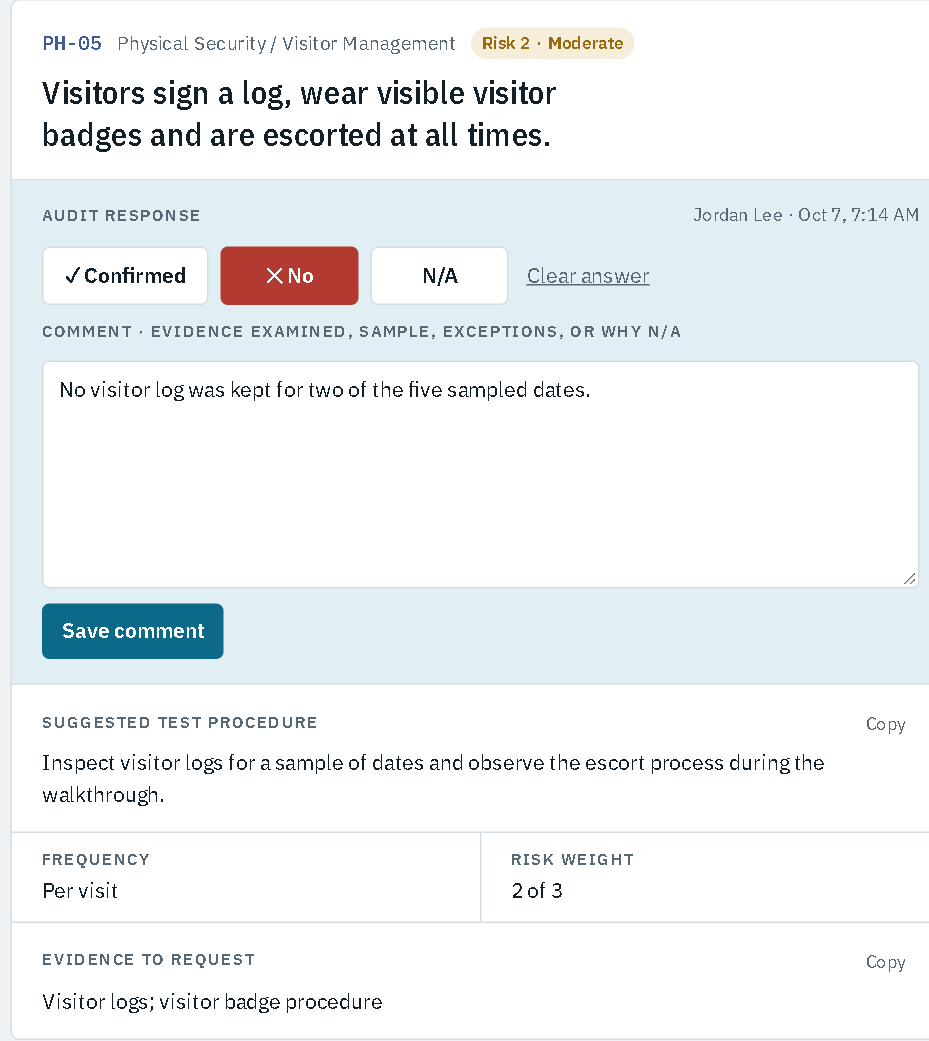
Respond. A control with its test procedure and evidence list, answered No with a comment.
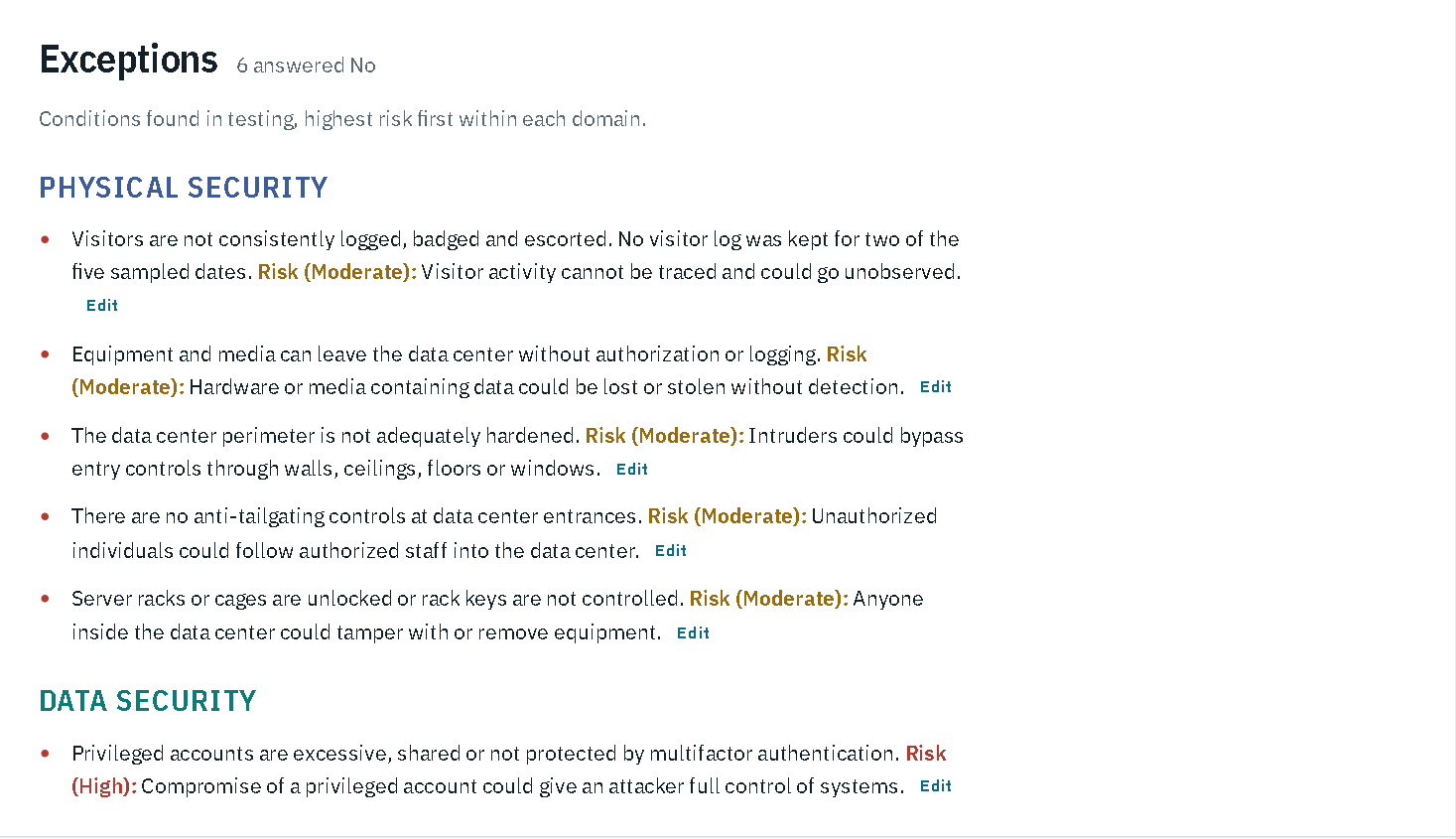
Review. Each No answer becomes an exception with its risk and effect, highest risk first.
Live demo
See the Data Center Security Review in action
The demo is the standalone edition running on this server, with sample answers already entered. Browse the controls, change an answer and watch the findings and project status update. Use the password demo to sign on and admin for the demo's Admin tab.
The demo asks you to sign in with your name and a sign-on password: on the AutoQ demo it is shown on the sign-in page; otherwise ask your administrator. Can't get in?
Read the Introduction. The executive overview is generated from the controls themselves.
Open Plan and pick a category. It lists the controls still to answer.
Answer a control No and add a comment. It's saved straight away.
Open Findings. Your answer is now an exception with its risk, effect and recommendation.
Check Project. The section's percentage and status have moved.
PDF, Word or Export CSV. These are the files you'd hand over, and the Word document is ready to edit.
Screens
Inside the review
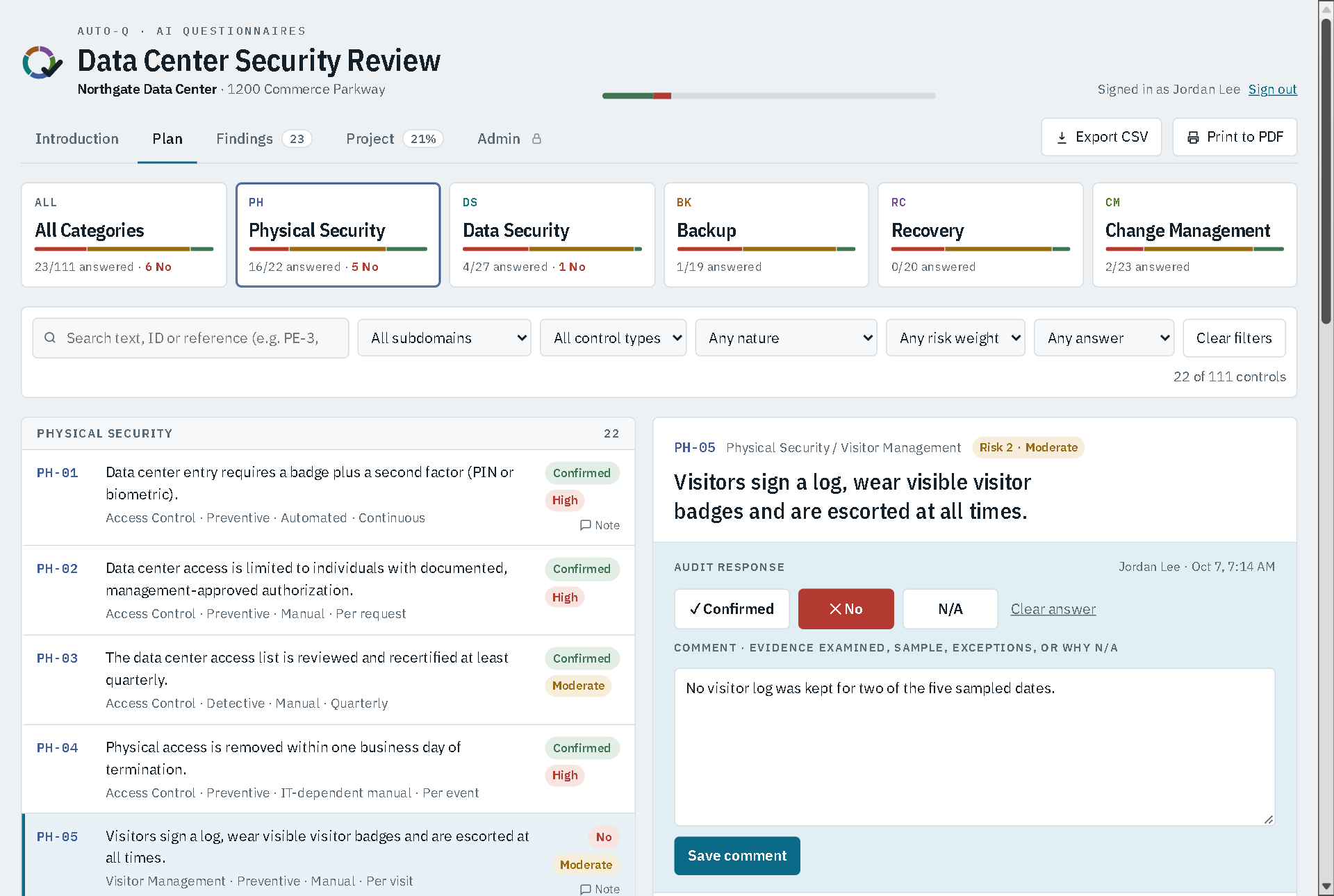
Plan. Category buttons, filters and search above the control list, with the open control on the right.
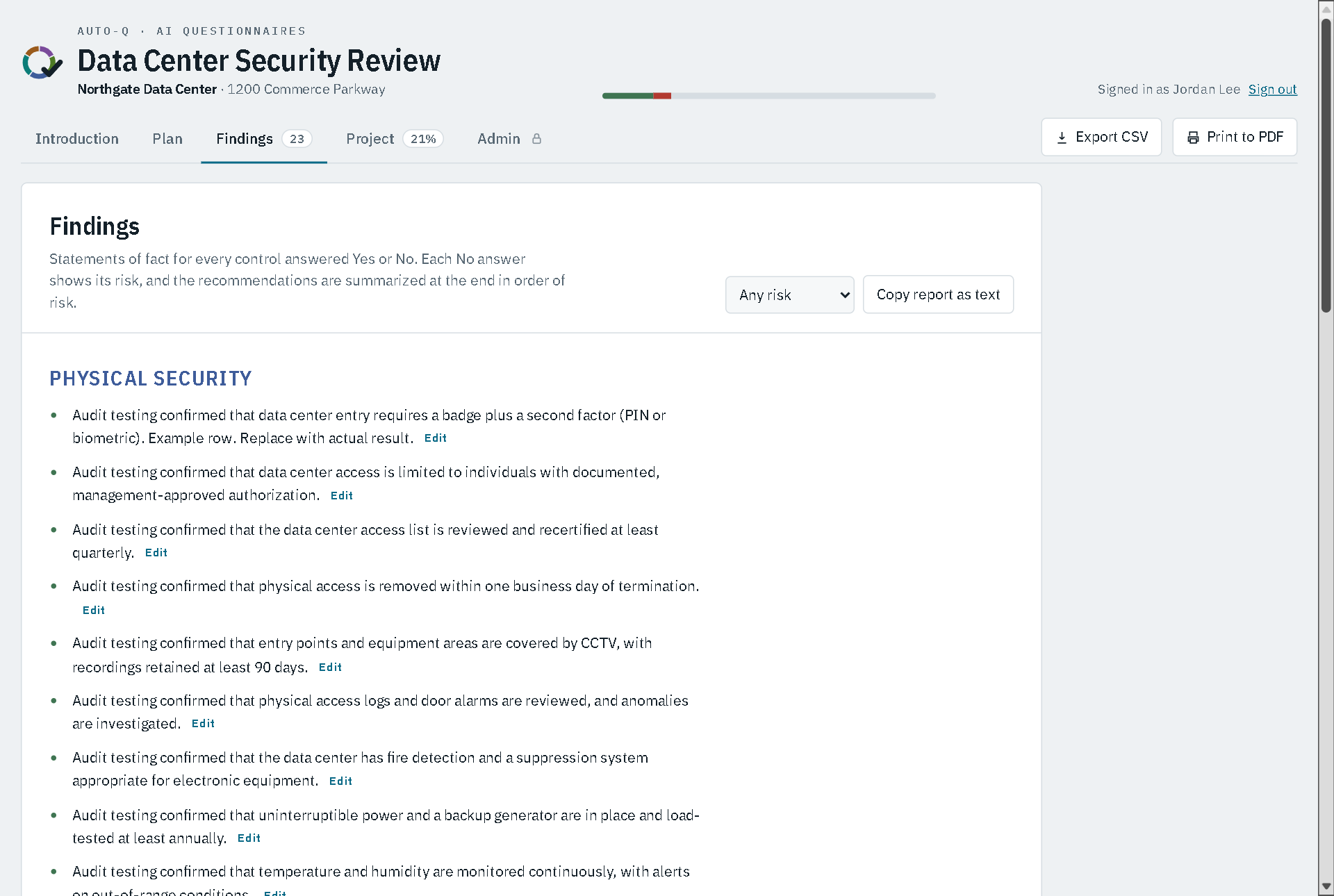
Findings. Statements of fact for confirmed controls, grouped by category, each with an Edit link.
Recommendations. One for each exception, ordered from high to low risk.
Project. Percentage complete by category, with high-risk exceptions and status, and a work calendar of the days the review was worked on.
Admin. Data center details, reports, backups, the project archive, passwords, Clear All and every manual and guide, behind the administrator password.
On the data center floor
The layout adapts to phones and tablets, so auditors can record answers during the walkthrough instead of transcribing notes afterwards. It follows the device's light or dark setting, or the Dark mode switch next to Sign out, and stays readable with Windows high contrast turned on.
Pricing
Free 14 Day Hosted Trial · Coming Soon
Draft pricing for discussion. Final prices to be confirmed.
Hosted projects on the AutoQ server: each project with its own link and passwords, and an account page for your organization. Coming soon. To hear first when hosted trials open, write to sales@autoq-ai.com.
Hosted
Single review
$1,500per data center review
Free 14-day trial (coming soon)
Hosted edition, nothing to install
Unlimited auditors on the review
All 111 controls and generated findings
PDF and CSV exports
Email support
Standalone · most popular
Site licence
$4,900per site, per year
Runs on your own Windows computer and network
Answers saved in your Excel workbook
Unlimited reviews and auditors at the site
Sign-on, lockout and security log
Updates and priority support
Enterprise Version 2.1
Multi-site
Customfor three or more sites
Contact us about converting your proprietary review content to an AutoQ system. It's easy and takes a minimum of time and effort.
Everything in the site licence
Several questionnaires from one server, with one sign-in
Separate passwords for each review or client
Create new AI-generated control questionnaires for any subject
Project reports: opening letter, team getting started guide, status report, meeting agenda and final report on your letterhead
Your own control library and ratings thresholds
Onboarding for your review / audit team
Help with HTTPS and network setup
Named support contact
Content packs
New questionnaires, ready to run
Each content pack is a complete Excel control questionnaire for a new subject: 100 controls with test procedures, evidence to request, generated findings and recommendations, criteria references and domain ratings. Add it to Enterprise Version 2.1 and it runs alongside your other reviews on the same server.
Content pack
Cyber Security Review
$299per content pack
100 controls in 5 categories: governance and risk, identity and access, technical protection, detection and monitoring, incident response and recovery
Mapped to NIST SP 800-53 Rev 5, ISO/IEC 27001:2022 and CIS Controls v8.1
Excel workbook (.xlsx) with review settings
Content pack
Construction Site Safety Review
$299per content pack
100 controls in 5 categories: site management and planning, working at height, plant, equipment and excavation, hazardous work and health, emergency response and site security
Mapped to OSHA 29 CFR 1926 / 1904 and ISO 45001:2018
Excel workbook (.xlsx) with review settings
Content pack
Your subject
$299per content pack
Tell us the subject and the frameworks you audit against
We research and build the questionnaire in the same format
Or build your own with the Enterprise Version 2.1 step-by-step guide
Content packs run on Enterprise Version 2.1. Criteria references should be checked by a qualified reviewer against the framework editions your audit uses.
Compare editions
Feature
Hosted
Standalone
Enterprise Version 2.1
111 controls with test procedures and evidence lists
Yes
Yes
Yes
Generated findings, exceptions and recommendations
Yes
Yes
Yes
Project status by category
Yes
Yes
Yes
PDF and CSV exports
Yes
Yes
Yes
Live updates between auditors
Yes
Yes
Yes
Sign-in
Your Claude account
Name plus shared password
Name plus the review's own or the shared password
Evidence files uploaded to each control, listed by category on Findings
No
No
Yes
Answers saved to your Excel workbook
No
Yes
Yes
Runs on your own network
No
Yes
Yes
Workbook backups and password changes on the Admin tab
No
Yes
Yes
Security log of sign-ins and admin actions
No
Yes
Yes
Several questionnaires from one server, listed after one sign-in
No
No
Yes
Separate passwords for each review or client
No
No
Yes
Create new AI-generated control questionnaires for other subjects
No
No
Yes
Project reports as PDFs: opening letter, getting started guide, status report, meeting agenda, final report
No
No
Yes
Download a review as one .zip, and re-load it here or on another server
No
No
Yes
Security
Audit findings describe weaknesses. We treat them that way.
These protections are in the standalone edition today. The hosted edition uses claude.ai sign-in and sharing to control who can open and change a review.
Locked until sign-in
Nothing in the review, including the answers, is sent to a browser until someone signs in.
Signed answers
The server records the signed-in name with every save. The browser can't change it.
Lockout
Three wrong passwords in a row block that computer for 15 minutes, even with the right password.
Security log
Failed sign-ins, lockouts, Admin unlocks and password changes are logged with the time, address and name.
Protected Admin tab
The server checks the administrator password, and the tab locks again after 30 minutes without activity.
Stored safely
Passwords changed in the app are stored salted and hashed, so they can't be read back from the file.
Your network
The standalone server runs on your own computer, and answers stay in your workbook. By default only that computer can open it.
Backups
A copy of the workbook is saved when the server starts, before every Clear All and before a project is re-loaded, with the 30 most recent kept. Enterprise Version 2.1 also downloads a whole review as one .zip, without passwords.
Encrypted connections
Install a certificate and the server switches to HTTPS, refuses anything older than TLS 1.2, and only sends the sign-in cookie encrypted.
Reviews kept apart
Enterprise Version 2.1: each review or client can have its own passwords. Without a review's password, people can't see its name, its progress or even that it exists.
Until a certificate is installed the standalone edition uses plain HTTP, so run it on a trusted internal network. Setting up HTTPS takes about 20 minutes, and Enterprise customers get help with it.
FAQ
Questions we hear from review / audit teams
Which frameworks are the controls mapped to?
Every control references NIST SP 800-53 Rev 5, ISO/IEC 27001:2022 Annex A and COBIT 2019. You can search the questionnaire by any of those references, for example PE-3, 8.13 or DSS05.
Do the findings go straight into our report?
They're written in report language, and Copy report as text puts the whole report on the clipboard for Word. Before issuing, add the cause you found during testing to each recommendation.
What's the difference between the hosted and standalone editions?
The hosted edition runs on claude.ai: you open a shared link and sign in with your account. The standalone edition runs on one Windows computer in your office, saves answers into your Excel workbook, and adds the security log, backups and password management. See .
What do we need to run the standalone edition?
One computer running Windows 10 or 11 (or Windows Server 2016 or later). A single installer sets everything up, including Node.js, in about five minutes and without needing internet access. Auditors only need a current browser on a computer, tablet or phone.
Can several auditors work at the same time?
Yes. Answers saved by one person appear on everyone else's screen within a few seconds, and each answer records who saved it and when.
Can it produce our audit reports?
Yes, with Enterprise Version 2.1. The Admin tab makes five reports as PDFs: the opening conference letter, a one-page getting started guide for team members, a project status report, a project review meeting agenda and the final report. The figures, exceptions, category ratings and findings come from the answers; you add your logo, the project details and your own wording. The reports are HTML templates, so their layout and standard text can be changed to your house style, for every review or just one. In every edition, the PDF, Word and Export CSV buttons are available on every tab.
How long does it take to get the team started?
Minutes. With Enterprise Version 2.1 the Admin tab makes a one-page getting started guide for your auditors, with the review's address, how to sign in and answer a control, their assignments and the deadline. Each auditor also gets a one-page User Quick Start, and administrators a one-page Administrator Quick Start covering installation to the final report, with the full manuals for detail.
Can we change the controls or the rating thresholds?
Yes. The controls live in the workbook's Control Library sheet and the thresholds in its Domain Summary sheet. Changes there show up in the review. With Enterprise Version 2.1 you can also create new AI-generated control questionnaires for any subject, following our step-by-step guide, or have us set one up for you.
Can we keep using Excel?
Yes. In the standalone edition the workbook is the record. Close it while people are saving, because Excel locks the file while it's open. Edits you save in Excel appear in the review within seconds.
How do we start the next review?
Export a CSV and PDFs for the record, or with Enterprise Version 2.1 download the whole project as one .zip, then use Clear All on the Admin tab. For a separate review per site or year, Enterprise Version 2.1 runs each one side by side on the same server.
Can we archive a finished review, or move it to another server?
Yes, with Enterprise Version 2.1. Download project (.zip) on the Admin tab saves the review as one file: the workbook with every answer and comment, the evidence files, the reports and the site and report details. Passwords are never included. Re-load a project loads that file back, into the same review or one on another server. The server checks the file first and moves everything it replaces into the backups folder, so nothing is lost.
What is Enterprise Version 2.1?
The edition for teams running more than one review. One server runs several questionnaires, such as one per data center, per client or per year, and lists them after a single sign-in. Each review keeps its own workbook, answers, evidence, backups and site details, and can have its own passwords so one client's team never sees another's review. It also runs your own control libraries for subjects other than data centers.
Order & download
Buy AutoQ and download the installer
Buy the site licence in our online store, by card or by purchase order. Card payments are taken by Lemon Squeezy, our reseller, which adds the right sales tax or VAT and emails your receipt; the store emails your download link.
Draft pricing and terms for discussion. Final prices and the licence agreement to be confirmed.
Hosted projects on the AutoQ server: each project with its own link and passwords, and an account page for your organization. Coming soon. To hear first when hosted trials open, write to sales@autoq-ai.com.
Tick this to enable Buy a hosted review. The store asks for it when you buy the site licence.
Standalone · download
Site licence
$4,900per site, per year
Installer for Windows, Node.js included
Answers saved in your own Excel workbook
Unlimited reviews and auditors at the site
The manuals and the one-page User and Administrator Quick Starts
Several questionnaires from one server, with one sign-in
Separate passwords for each review or client
Create new AI-generated control questionnaires for any subject
Project reports as PDFs, on your letterhead
Onboarding and a named support contact
Quote and invoice, or purchase order
Online checkout for hosted reviews opens soon. Until then, and we'll send an invoice.
How ordering works
From checkout to first review in an afternoon
Already bought? Your order email from the store has the download link. If it has expired or gone missing, reply to that email and we'll send a new one.
Choose Buy site licence and accept the licence agreement in the store.
Pay by card or send a purchase order. Cards and PayPal are taken securely by Lemon Squeezy; we never see your card details. A purchase order is checked within one business day.
Download the installer from the link the store emails you, straight after payment or once your purchase order is approved.
Run it on the server computer. It installs Node.js if needed, takes about five minutes and needs no internet access.
Sign in and change the passwords straight away, following the one-page Administrator Quick Start included with the download.
Download
Current release
Your download link gives you these files. Check a file's SHA-256 fingerprint in PowerShell with Get-FileHash <file> before running it.
Enterprise Version 2.1 (2.1.0), published 2026-10-13. Includes the Data Center Security Review.
File
Size
SHA-256
DataCenterSecurityReview-Enterprise-Setup-2.1.0.exe Installer · Windows installer, Node.js included (recommended)
One server computer running Windows 10 or 11 (64-bit) or Windows Server 2016 or later
About 120 MB of disk space, plus about 60 KB per workbook backup
Administrator rights to install; a normal account can then run it
For team use, TCP port 3000 open on your network (3443 with HTTPS)
Auditors: any current Edge, Chrome, Firefox or Safari, on a computer, tablet or phone
What's new in Enterprise Version 2.1
Several reviews from one server, listed after a single sign-in
Separate passwords for each review or client, with reviews hidden from anyone without their password
Runs any control questionnaire laid out like ours, with a checking command for new workbooks
A guide to creating new AI-generated control questionnaires
Project reports as PDFs: opening conference letter, getting started guide for the team, status report, meeting agenda and final report, with your logo and wording
One-page quick guides: a getting started guide for each auditor, a User Quick Start and an Administrator Quick Start
Upload/View Evidence on every control, with the evidence listed by category on the Findings tab
Project archive: download a review's workbook, evidence, reports and details as one .zip, and re-load it to restore the review or move it to another server
Site details saved to the workbook too, on a Site Details sheet
One installer, Node.js included, with no internet needed
The Administrator Manual and the Administrator Quick Start come with your download, because they contain the default passwords, and so does the guide to building new questionnaires.
Refunds
If AutoQ doesn't work for you, ask for a full refund within 30 days of your first licence purchase. Renewals can be cancelled before the renewal date. Refunds are issued by Lemon Squeezy to the original payment method.
The licence in brief
A site licence covers one installation at one site, for any number of your staff and reviews, for one year. Your data stays on your network: we never receive your answers or workbooks. The licence agreement is the full and binding text.
Contact
Talk to the AutoQ team
Ask for a walkthrough, a standalone trial or a quote. Tell us how many data centers you review each year.
Salessales@autoq-ai.comQuotes, orders, purchase orders, invoices and walkthroughs
Supportsupport@autoq-ai.comInstallation, sign-in, hosted accounts and anything not working as it should
PrivacyThis website uses no tracking cookies. To keep it secure, the server records the date and time, page, IP address, approximate location and referring page of each page visited (including each tab of this website), kept for security and usage statistics and not shared. The location (city, region, country and network) is looked up from the IP address through the ipwho.is service. Card payments are taken by Lemon Squeezy; we never see card details.
Admin
AutoQ administration
For the AutoQ team: the Store Manual and the online store's administration. This isn't the Admin tab of a review, which is for its audit lead.
The Admin tab works when this website is served by the AutoQ server.
Signed in as
Documents
Search the manuals Find a word, phrase or section in all eight AutoQ manuals and open the master manual at that page.
A time-stamped line for every page visited: each tab of this website, the sign-in, reviews, the store, hosting sign-up and account pages, admin pages and the billing portal, kept in accesslog.txt in the server's data folder. Pictures and downloads aren't pages and aren't listed.
On the server computer, open PowerShell with Run as administrator, go to the installation folder and run one of these. autostart.ps1 is already in the installation folder; the copy under Documents is the same file.
cd "C:\Program Files\Auto-Q"
powershell -ExecutionPolicy Bypass -File .\autostart.ps1 install -Network     # start at power-on, open to the network
powershell -ExecutionPolicy Bypass -File .\autostart.ps1 status               # is it running?
powershell -ExecutionPolicy Bypass -File .\autostart.ps1 remove               # stop starting automatically
Add -DryRun to see what install would do. For HTTPS add -Port 443 -HttpsPfx <file.pfx> -HttpsPassphrase <password> -HttpRedirectPort 80. Messages go to data\server.log. Administrator Manual, section 4.5.
Orders from the online store. Card payments are collected and invoiced by Lemon Squeezy. Purchase orders are invoiced here: Print invoice makes the invoice (numbered, due in 30 days) and opens it to print or save as PDF; Mark paid when the payment arrives. Hosted project subscriptions are billed by Lemon Squeezy and aren't listed.
Order
Customer
Product
Amount
Invoice
Status
Hosted accounts
Clients' hosted accounts on this server. Each account has an account administrator, who sees its projects' links and status and sets each project's lead and team passwords. Content packs offered for new projects are the folders in data\packs. Clients sign up themselves at /hosting/ while hosting is switched on.